Monday, 18 June 2012
Having problem setting up Facebook Autorisation in Joomla Autotweet
If you're having a problem with 1st Movers Autotweet and more importantly the authorization then try a different browser ! Because for me soon as I tried Chrome instead on Mozilla it worked.

Friday, 15 June 2012
How to set up a new email address in Heart Internet - and on Outlook
To get a new mail address
> login to the control panel
> Find an click on 'Mail Boxes' which is the
second group of icons down under 'Email
> enter the name you want before the '@whateverdomain.com'
> enter the name you want before the '@whateverdomain.com'
> and click on 'create'
Setting up email in Outlook 2010
1. Start Outlook.
2. On the File menu, click Account Settings.
3. Click New.
4. Click E-mail Account
5. In the Auto Account Setup dialog box, click to select the Manually configure server settings or additional server types check box, and then click Next.
6. Click Internet E-Mail, and then click Next.
7. Fill out the required settings as following:
Your Name: Your name exactly as you want it to appear to recipients when they receive email from you
Email Address: your full email address - eg jsmith@my-domain.com
Account Type: IMAP (recommended)
Incoming mail server: mail. -
replace with your domain name, so for example
mail.my-domain.com
Outgoing mail server (SMTP): mail.
- same as the Incoming mail server
Username: your full email address once again
Password: your mail box password
Ensure that 'Require logon using Secure Password Authentication (SPA) remains unchecked. This is important as you may experience difficulty sending email with this enabled.
8. Click "More Settings..." in the bottom right of the window
9. Click "Outgoing Server" tab at the top.
10. Tick the box labelled "My outgoing server (SMTP) requires authentication"
11. Click "Advanced" tab at the top
12. In the Outgoing mail (SMTP) box, type 25. *Note, if you have trouble sending e-mail, please try changing this to port 587.
13. Ensure that 'This server requires an encrypted connection (SSL) is unchecked
14. The 'Use the following type of encrypted connection:' option should be set to None
15. Click "Ok" to close the window.
16. Click Next after you have completed entering this configuration information, and then click Finish
2. On the File menu, click Account Settings.
3. Click New.
4. Click E-mail Account
5. In the Auto Account Setup dialog box, click to select the Manually configure server settings or additional server types check box, and then click Next.
6. Click Internet E-Mail, and then click Next.
7. Fill out the required settings as following:
Your Name: Your name exactly as you want it to appear to recipients when they receive email from you
Email Address: your full email address - eg jsmith@my-domain.com
Account Type: IMAP (recommended)
Incoming mail server: mail.
Outgoing mail server (SMTP): mail.
Username: your full email address once again
Password: your mail box password
Ensure that 'Require logon using Secure Password Authentication (SPA) remains unchecked. This is important as you may experience difficulty sending email with this enabled.
8. Click "More Settings..." in the bottom right of the window
9. Click "Outgoing Server" tab at the top.
10. Tick the box labelled "My outgoing server (SMTP) requires authentication"
11. Click "Advanced" tab at the top
12. In the Outgoing mail (SMTP) box, type 25. *Note, if you have trouble sending e-mail, please try changing this to port 587.
13. Ensure that 'This server requires an encrypted connection (SSL) is unchecked
14. The 'Use the following type of encrypted connection:' option should be set to None
15. Click "Ok" to close the window.
16. Click Next after you have completed entering this configuration information, and then click Finish
Thursday, 14 June 2012
Joomla 2.5 Payroll System
If you're looking for a Payroll System for Joomla 2.5 then we have been developing one here. Although it's very much in Beta version .
The payroll system is designed as separate system to sit on intranet and has a frontpage admin system that you can
* Add location
* Add/edit Employees
* Staff Invoices
* Company Invoices
* Add Timesheet
* Timesheet alteration
* Post date Invoicing
* BACS reporting
* Alterations
If you're interested in this then please contact me as the project now needs funding to get it out of Beta and into a proper release.
Contact Little Ripples
The payroll system is designed as separate system to sit on intranet and has a frontpage admin system that you can
* Add location
* Add/edit Employees
* Staff Invoices
* Company Invoices
* Add Timesheet
* Timesheet alteration
* Post date Invoicing
* BACS reporting
* Alterations
If you're interested in this then please contact me as the project now needs funding to get it out of Beta and into a proper release.
Contact Little Ripples
Wednesday, 13 June 2012
How to limit the search of Latest Timesheets in Joomla Payroll system
Change in com_projectfork/latest_timesheets/
put a limit on SELECT * FROM vfvi7_pf_time_tracking
OPEN com_projectfork/views/latest_timesheets/view.html.php
change line 107 to
$query = "SELECT * FROM #__pf_time_tracking order by id DESC limit 20";
put a limit on SELECT * FROM vfvi7_pf_time_tracking
OPEN com_projectfork/views/latest_timesheets/view.html.php
change line 107 to
$query = "SELECT * FROM #__pf_time_tracking order by id DESC limit 20";
Tuesday, 12 June 2012
Adding the Location to the Venue information in Joomla Payroll Component
OPEN
components/com_projectfork/views/add_timesheet/view.html.php
Line 68 has been changed to the following
//get venues
$query = "SELECT id,title,location FROM #__pf_projects order by title ";
$db->setQuery($query);
$rows = $db->loadObjectList();
foreach($rows as $row){
$venues[$row->id] = $row->title.' - '.$row->location;
}
$this->assign('venues', $venues);
components/com_projectfork/views/add_timesheet/view.html.php
Line 68 has been changed to the following
//get venues
$query = "SELECT id,title,location FROM #__pf_projects order by title ";
$db->setQuery($query);
$rows = $db->loadObjectList();
foreach($rows as $row){
$venues[$row->id] = $row->title.' - '.$row->location;
}
$this->assign('venues', $venues);
Thursday, 7 June 2012
how do I reverse the BACS check to run a report for a second time in Joomla Payrollsystem
In Joomla Payrollsystem how is the check for 'BACS of This Date Are Already Generated' done .
Open components/com_projectfork/models/bacs.php
at line 25 examine this code.
[code]
$lstdate = "SELECT last_end_date FROM #__time_diff LIMIT 1";
$db->setQuery($lstdate);
$l_date = $db->loadResult();
if(($startTime<=$l_date)and($endTime<$l_date))
[/code]
basically if does a search in __time_diff the last set of results and then from here on you can run a BACS report.
So if I delete all results in __time_diff I will be able to re run the BACS again.
This system doesn't seem ideal but will work as long as BACS runs are always done in the order they should be.
Wednesday, 6 June 2012
How to set up Multiple Accounts on a Heart Internet Dedicated server
Setting up a Dedicated Server on Heart Internet.
I've never had that much to do with setting up servers so once we got our Dedicated server things . The first thing I realised is this
* the basic dedicated server set up does not have a WHM / Cpanel installed - this service will cost you an extra £20 a month. This may effect your decision whether to use a dedicated server or not.
Once you have WHM then you need to set up you CPANEL accounts for the multiple domains your going to have on your server.
take a look at the WHM documentation to see how to do this
http://docs.cpanel.net/twiki/bin/view/AllDocumentation/WHMDocs/WebHome
How to set up multiple domain on my server using WHM ?
WHM how to set up a new account ?
WHM where to start with setting up sites ?
take a look at this post http://forums.cpanel.net/f354/whm-where-start-setting-up-sites-150661.html
The big clue here that I needed to stumble upon is that before setting up a new account I need to create a package.
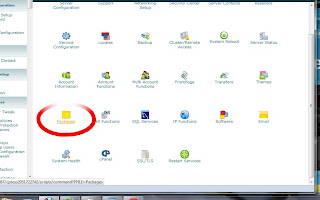
After you make a Package then you need to make an account.
To do this click on 'Account Functions'
and then on the next screen you'll have a 'create new account' option.
Here's a couple of questions I had while setting things up
should I enable DKIM on my DNS settings ?
DKIM stands for Domain Keys Identified Mail (DKIM) and is a layer of security , so I will be added by it.
http://en.wikipedia.org/wiki/DomainKeys_Identified_Mail
and should I enable SPF on my DNS settings
Sender Policy Framework - http://en.wikipedia.org/wiki/Sender_Policy_Framework
again a security layer. -> http://en.wikipedia.org/wiki/Sender_Policy_Framework
After click on 'adding the new account' I got this message
Account Creation Status: failed
Your system has run out of available ip addresses, or you do not have permission to use any more ip addresses. (Unable to find an ip address.)
this because in the package set up i needed to have 'Dedicated IP' unticked.
After this you get sent the account details for your new account and will need to login to that in a new browser window.
I've never had that much to do with setting up servers so once we got our Dedicated server things . The first thing I realised is this
* the basic dedicated server set up does not have a WHM / Cpanel installed - this service will cost you an extra £20 a month. This may effect your decision whether to use a dedicated server or not.
Once you have WHM then you need to set up you CPANEL accounts for the multiple domains your going to have on your server.
take a look at the WHM documentation to see how to do this
http://docs.cpanel.net/twiki/bin/view/AllDocumentation/WHMDocs/WebHome
How to set up multiple domain on my server using WHM ?
WHM how to set up a new account ?
WHM where to start with setting up sites ?
take a look at this post http://forums.cpanel.net/f354/whm-where-start-setting-up-sites-150661.html
The big clue here that I needed to stumble upon is that before setting up a new account I need to create a package.

After you make a Package then you need to make an account.
To do this click on 'Account Functions'
and then on the next screen you'll have a 'create new account' option.
Here's a couple of questions I had while setting things up
should I enable DKIM on my DNS settings ?
DKIM stands for Domain Keys Identified Mail (DKIM) and is a layer of security , so I will be added by it.
http://en.wikipedia.org/wiki/DomainKeys_Identified_Mail
and should I enable SPF on my DNS settings
Sender Policy Framework - http://en.wikipedia.org/wiki/Sender_Policy_Framework
again a security layer. -> http://en.wikipedia.org/wiki/Sender_Policy_Framework
After click on 'adding the new account' I got this message
Account Creation Status: failed
Your system has run out of available ip addresses, or you do not have permission to use any more ip addresses. (Unable to find an ip address.)
this because in the package set up i needed to have 'Dedicated IP' unticked.
After this you get sent the account details for your new account and will need to login to that in a new browser window.
Subscribe to:
Posts (Atom)